
In earlier parts of this series, we focused on establishing reachability, navigating LSDB mechanics, and enforcing boundary rules across different area types. With that foundation in place, this post shifts focus toward optimizing control plane scalability and traffic steering across a multi-area topology.
Without route summarization, any localized link flap inside a non-backbone area forces re-computations and updates across the entire backbone. At the same time, relying on default OSPF reference bandwidth settings leaves modern high-speed links evaluated at identical costs, preventing accurate path selection.
By combining inter-area and external route summarization with global reference bandwidth tuning, Equal-Cost Multi-Path (ECMP), Loop-Free Alternate (LFA), and IP Fast Reroute, we can protect Area 0 stability, enforce bandwidth-aware traffic forwarding, and achieve sub-second hardware failover.
- SR OS Version: 25.7.R1
- CLI Mode: MD-CLI (Model-Driven CLI)
Prerequisites: Subnet Baseline
Configure Area 1 Subnets (R1)
Assign loopback interfaces for 10.10.0.0/24 through 10.10.3.0/24 and bind them to Area 1 in OSPF:
/configure router "Base" interface "loopback-1" ipv4 primary address 10.10.0.1 prefix-length 24
/configure router "Base" interface "loopback-1" loopback
/configure router "Base" interface "loopback-2" ipv4 primary address 10.10.1.1 prefix-length 24
/configure router "Base" interface "loopback-2" loopback
/configure router "Base" interface "loopback-3" ipv4 primary address 10.10.2.1 prefix-length 24
/configure router "Base" interface "loopback-3" loopback
/configure router "Base" interface "loopback-4" ipv4 primary address 10.10.3.1 prefix-length 24
/configure router "Base" interface "loopback-4" loopback

/configure router "Base" ospf 0 area 1 interface "loopback-1" interface-type point-to-point
/configure router "Base" ospf 0 area 1 interface "loopback-2" interface-type point-to-point
/configure router "Base" ospf 0 area 1 interface "loopback-3" interface-type point-to-point
/configure router "Base" ospf 0 area 1 interface "loopback-4" interface-type point-to-point

/commit
Configure External Subnets on ASBR (R2)
Configure blackhole static routes on R2 to simulate external prefixes (172.16.0.0/24 through 172.16.3.0/24) to redistribute into OSPF:
/configure router "Base" static-routes route 172.16.0.0/24 route-type unicast blackhole admin-state enable
/configure router "Base" static-routes route 172.16.1.0/24 route-type unicast blackhole admin-state enable
/configure router "Base" static-routes route 172.16.2.0/24 route-type unicast blackhole admin-state enable
/configure router "Base" static-routes route 172.16.3.0/24 route-type unicast blackhole admin-state enable

/commit
Redistribute the Static Routes into OSPF prior to aggregation (R2)
The export policy was already added to OSPF in Part 3.
/configure policy-options prefix-list "static-routes" prefix 172.16.0.0/22 type longer
/configure policy-options policy-statement "export-external" entry 15 from prefix-list "static-routes"
/configure policy-options policy-statement "export-external" entry 15 from protocol name static
/configure policy-options policy-statement "export-external" entry 15 action action-type accept

/commit
Pre-Summarization Verification (R2)
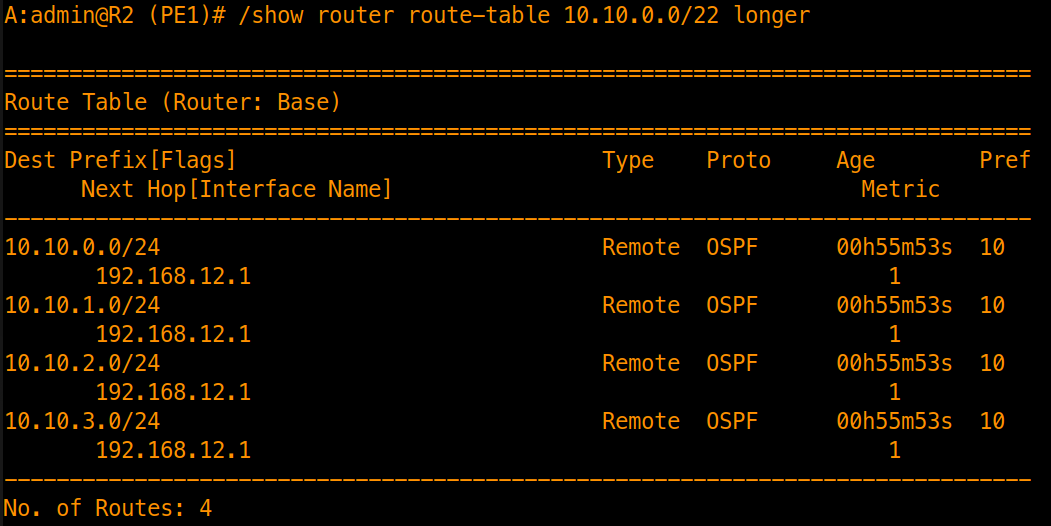
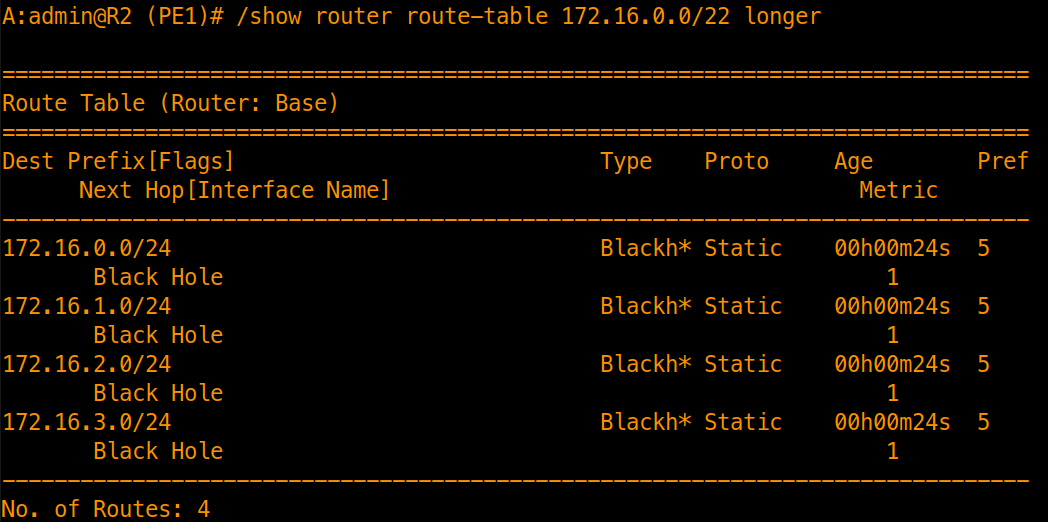
Confirm that all 8 individual subnets are active in the routing table before summarization:
/show router route-table 10.10.0.0/22 longer
/show router route-table 172.16.0.0/22 longer
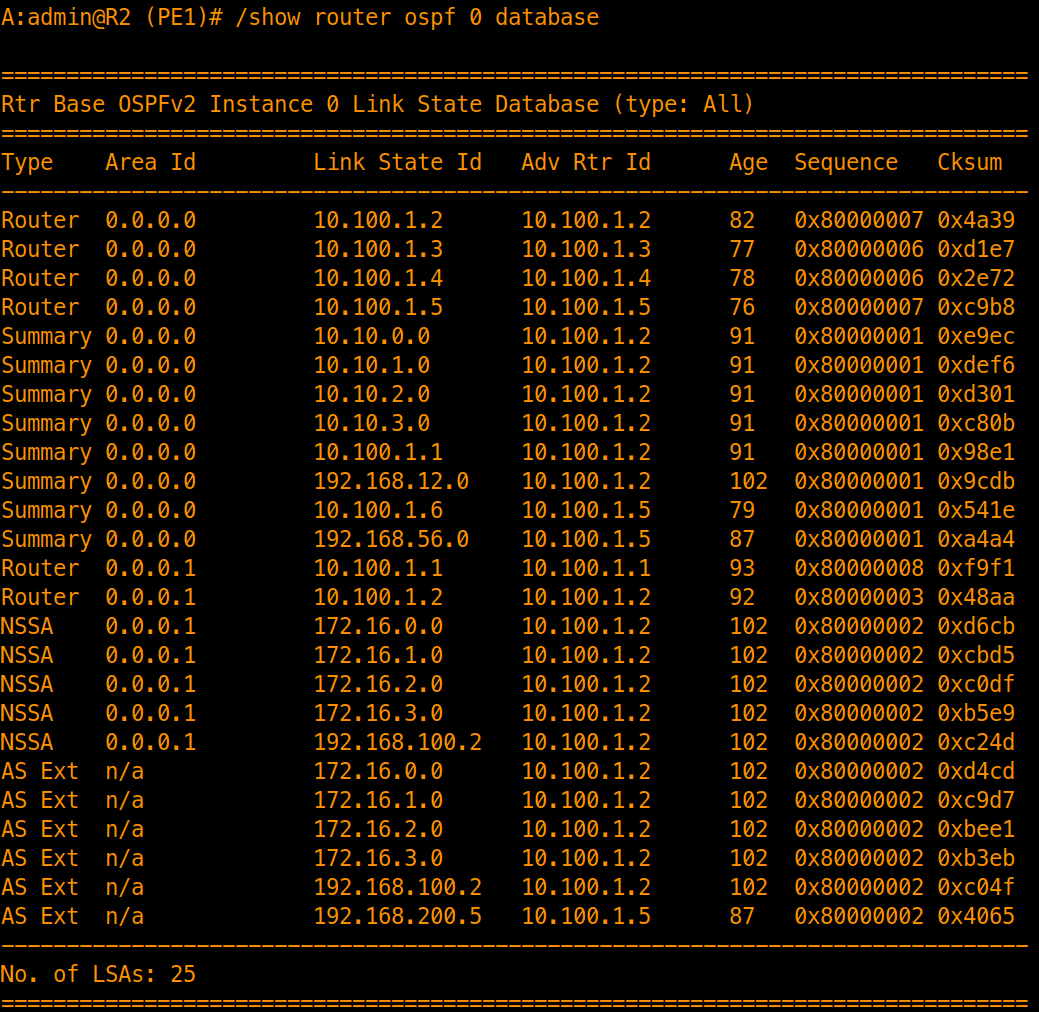
Inspect the Link-State Database for individual prefixes before summarization. Area 1 subnets appear as Type 3 Summary LSAs in Area 0, while external static routes appear as Type 7 LSAs in Area 1 (NSSA) and Type 5 LSAs in Area 0:
/show router ospf 0 database
Inter-Area & External Route Summarization
To protect Area 0 from instability in non-backbone areas and reduce routing table overhead, aggregate contiguous subnets at area boundaries before flooding LSAs.
Inter-Area Route Summarization (ABR R2)
Configure ABR (R2) to aggregate contiguous Area 1 loopbacks (10.10.0.0/24–10.10.3.0/24) into a single Type 3 Summary LSA:
# On ABR (Area 1 Summarization into Area 0)
/configure router "Base" ospf 0 area 1 area-range 10.10.0.0/22 advertise true
/commit
External Route Summarization (ASBR R2)
1. Create the Aggregate Route
Define the /22 aggregate prefix in the routing table, which generates a summary route as long as at least one specific underlying subnet (172.16.0.0/24–172.16.3.0/24) exists in the routing table. Setting summary-only true suppresses the contributing /24 static routes (redistributed earlier via entry 15) from being exported into OSPF, ensuring only the aggregate prefix is advertised:
/configure router "Base" aggregates aggregate 172.16.0.0/22 summary-only true
/commit
2. Configure Policy Options to Export Only the Summary
Create a prefix list for the aggregate prefix and export it as protocol aggregate into OSPF (the export policy was already added to OSPF in Part 3):
/configure policy-options prefix-list "EXTERNAL-SUMMARY" prefix 172.16.0.0/22 type exact
/configure policy-options policy-statement "export-external" entry 20 from prefix-list "EXTERNAL-SUMMARY"
/configure policy-options policy-statement "export-external" entry 20 from protocol name aggregate
/configure policy-options policy-statement "export-external" entry 20 action action-type accept

/commit
Summarization Verification (R2)
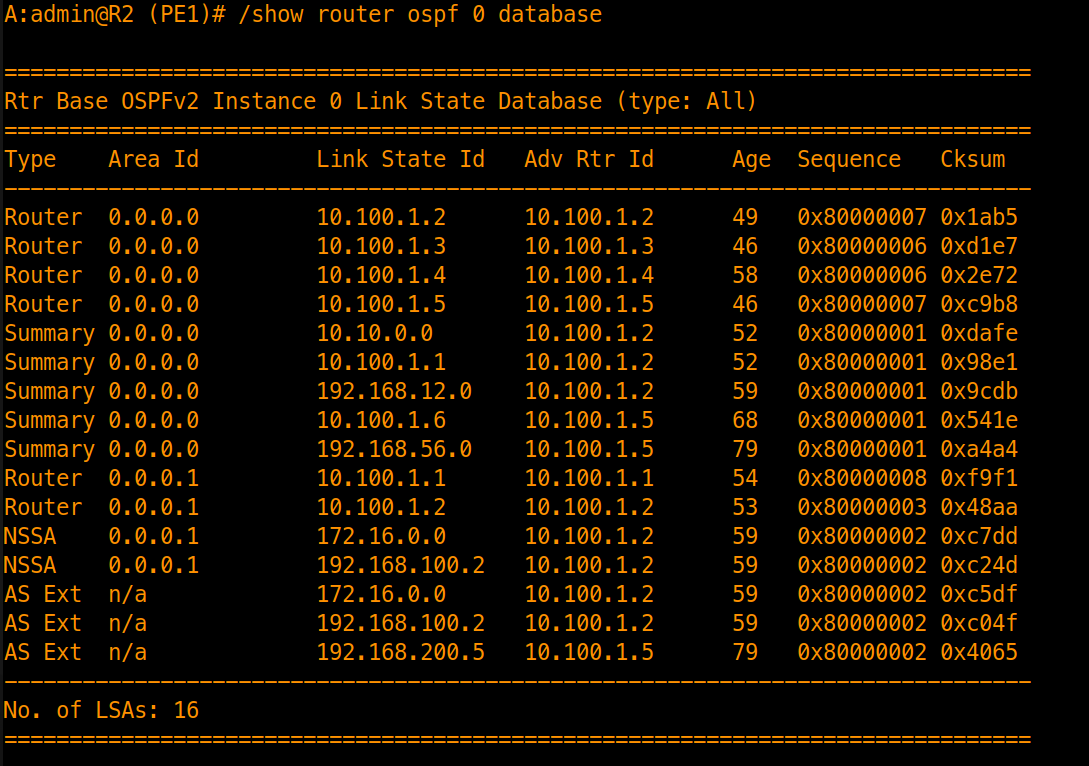
Inspect the Area 0 Link-State Database on R2. Because OSPF routers within the same area maintain synchronized, identical link-state databases, verifying the Area 0 database on R2 confirms what has been flooded across the entire Area 0 backbone:
/show router ospf 0 database
- Success Criteria:
- The four individual
10.10.x.x/24Type 3 Summary LSAs are replaced by a single aggregated Type 3 LSA for10.10.0.0/22. - The
/22aggregate route is exported into OSPF as a single Type 5 LSA in Area 0 and a Type 7 LSA in Area 1 (NSSA) for172.16.0.0/22.
- The four individual
Global Reference Bandwidth Tuning
Legacy network operating systems default to a reference bandwidth of 100 Mbps (100,000 Kbps). In modern networks, this causes any interface operating at or above 100 Mbps (1G, 10G, 100G) to evaluate to an identical OSPF metric of 1, eliminating metric differentiation and leading to suboptimal path selection.
Nokia SR OS addresses this legacy limitation by defaulting to a 100 Gbps reference bandwidth (100,000,000 Kbps). Under this default:
- 1 Gbps interface = metric 100
- 10 Gbps interface = metric 10
- 100 Gbps interface = metric 1
However, in networks deploying modern 400GE and 800GE interfaces, the default 100 Gbps reference bandwidth encounters the same limitation: both 400G and 800G evaluate to the minimum cost of 1. To maintain bandwidth-aware path selection across modern high-capacity optics, the reference bandwidth should be tuned to 1 Tbps (1,000,000,000 Kbps).
Configuration
Adjust the reference bandwidth across the OSPF domain:
/configure router "Base" ospf 0 reference-bandwidth 1000000000
/commit
[!IMPORTANT] Reference bandwidth is an OSPF instance-level parameter that must be configured identically across all routers in the OSPF domain. Mismatched reference bandwidth settings cause routers to calculate inconsistent path metrics, resulting in asymmetric forwarding and potential routing loops.
Verification
Verify OSPF cost calculations across active links to confirm metrics scale according to true link bandwidth:
/show router route-table protocol ospf
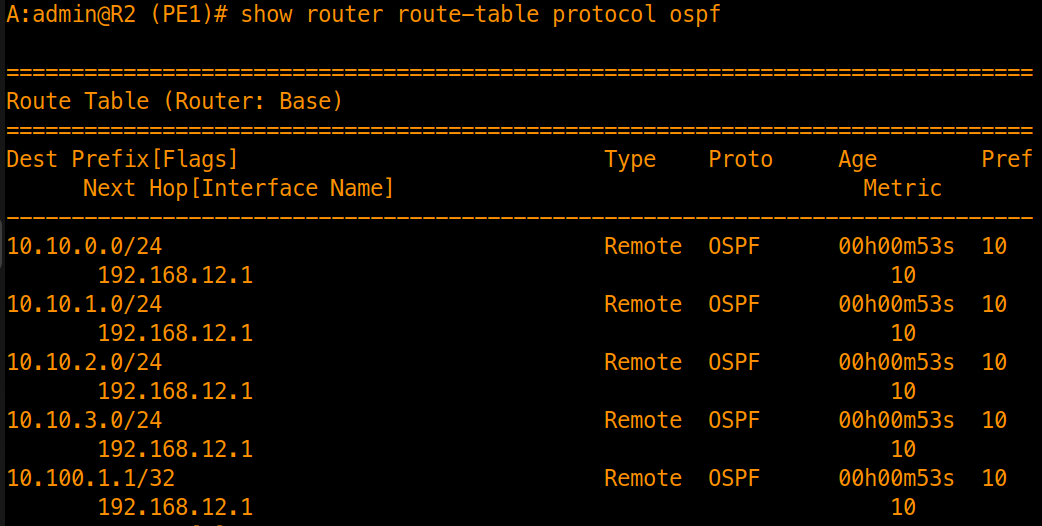
- Success Criteria: Metrics dynamically reflect link capacities above 100G (e.g., the 100G interfaces used now calculate to cost 10) rather than cost 1.
[!NOTE] To retain the 100 Gbps reference bandwidth baseline for the remainder of this series, revert the reference bandwidth back to the system default:
/configure router "Base" ospf 0 delete reference-bandwidth
/commit
(Alternatively, explicitly setting
/configure router "Base" ospf 0 reference-bandwidth 100000000re-applies the 100 Gbps default).
Equal-Cost Multi-Path (ECMP)
When multiple equal-cost paths exist between a source and destination, OSPF can install multiple next-hops in the forwarding tables to achieve active-active load balancing.
Configuration (R2)
Maintain equal metrics across the diamond core links and enable ECMP globally under the base router context:
# Enable ECMP globally across the base router context
/configure router "Base" ecmp 4
/commit
Verification
Inspect the active routing table filtered by OSPF:
/show router route-table protocol ospf
Filtering by
protocol ospfdisplays all OSPF-learned routes and highlights multipath next-hops while excluding local, direct, and system routes. Alternatively, specifying/show router route-table 10.100.1.5/32isolates the target destination prefix directly.
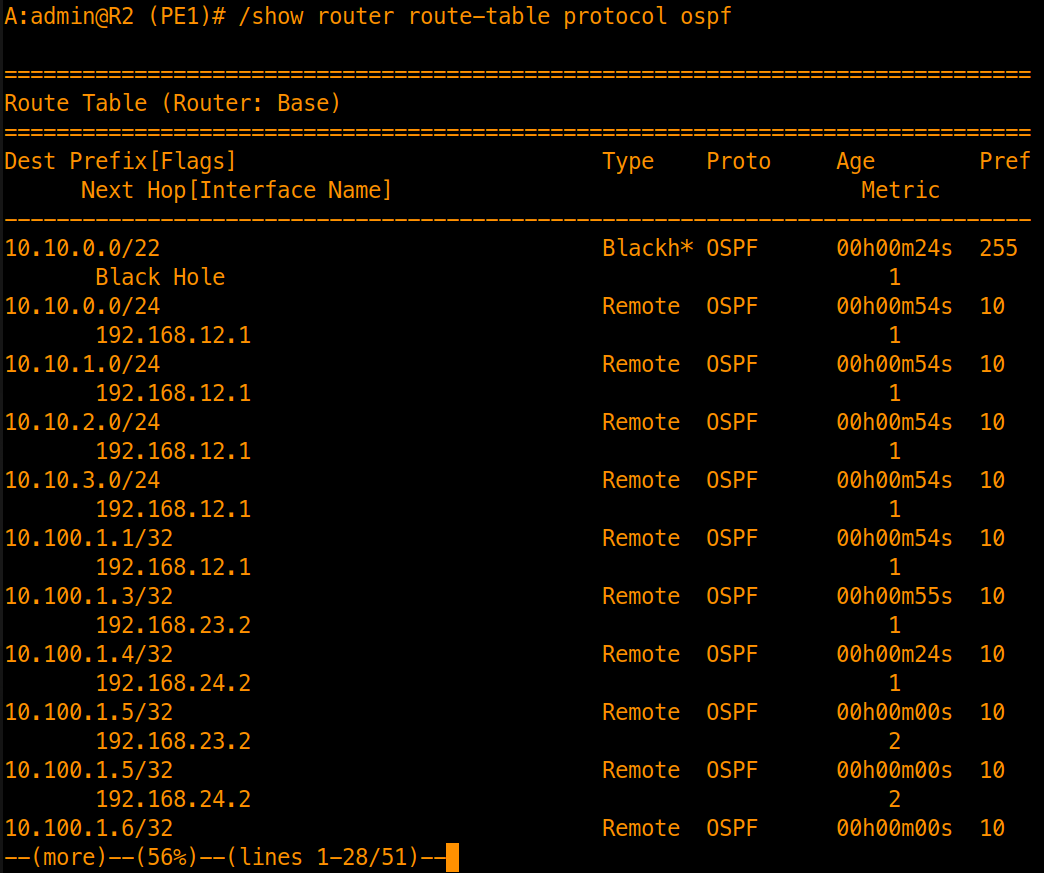
- Success Criteria: The destination prefix (
10.100.1.5/32) corresponding to R5 displays two active next-hops (192.168.23.2corresponding to the interface on R3 and192.168.24.2corresponding to the interface on R4) installed simultaneously in the routing table with identical metric costs.
Loop-Free Alternate (LFA) & IP Fast-Reroute (IP FRR)
Enabling Loop-Free Alternate (LFA) allows OSPF to pre-calculate backup next-hops, while IP FRR adds those LFA next-hops into the Forwarding Information Base (FIB) so they are programmed and ready for immediate hardware forwarding.
Step 1: LFA Configuration (R2)
Increase the metric of the lower path to establish an asymmetric primary/secondary path relationship, and enable loopfree-alternate under OSPF:
# Enable Loop-Free Alternate calculations in OSPF
/configure router "Base" ospf 0 loopfree-alternate
/commit

# Increase Lower Path Cost to force Primary/Backup path selection
/configure router "Base" ospf 0 area 0 interface "toR3" metric 10
/configure router "Base" ospf 0 area 0 interface "toR4" metric 30
/commit
Step 2: Verify LFA Routes in Routing Table
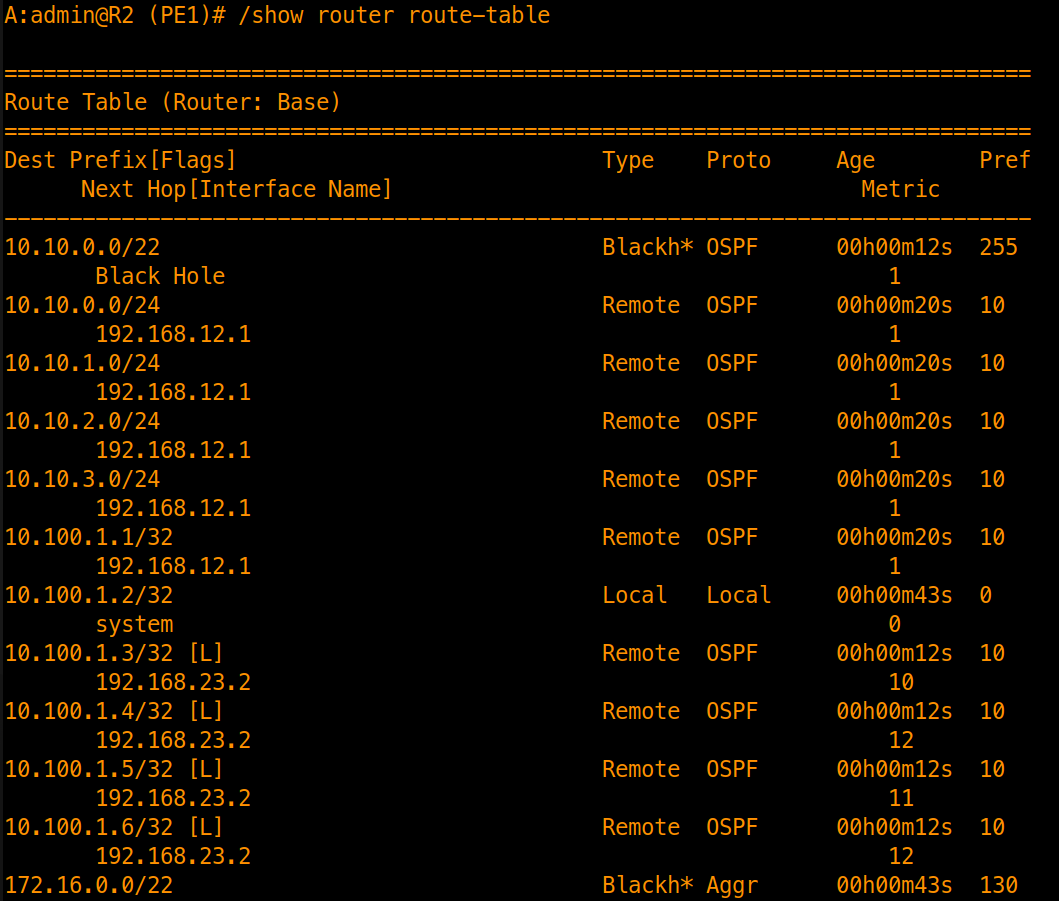
Inspect the routing table entries and alternate OSPF routes to confirm the presence of backup next-hops:
/show router route-table
- Look for the
Lflag indicating an LFA backup path exists.
/show router route-table alternative
- Look for the
(LFA)flag indicating the designated alternate next-hop.
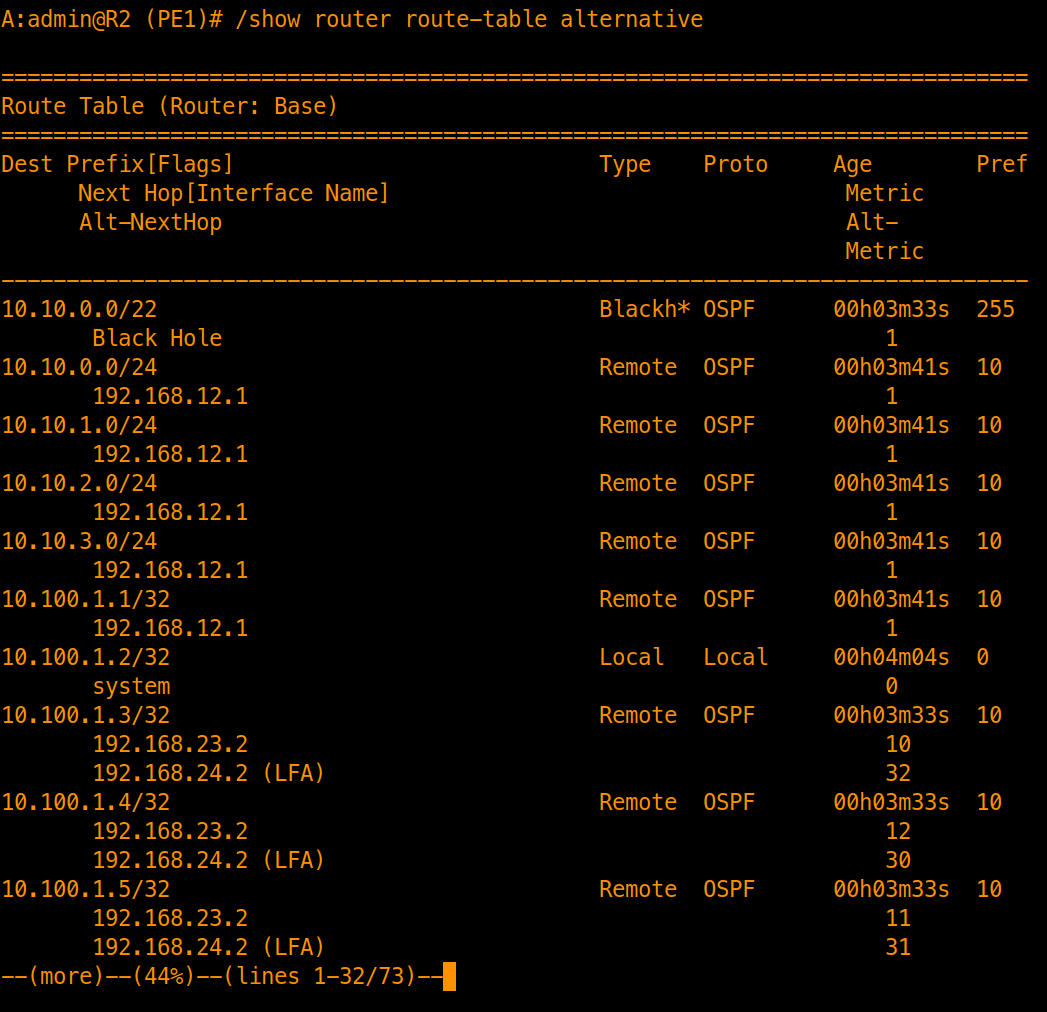
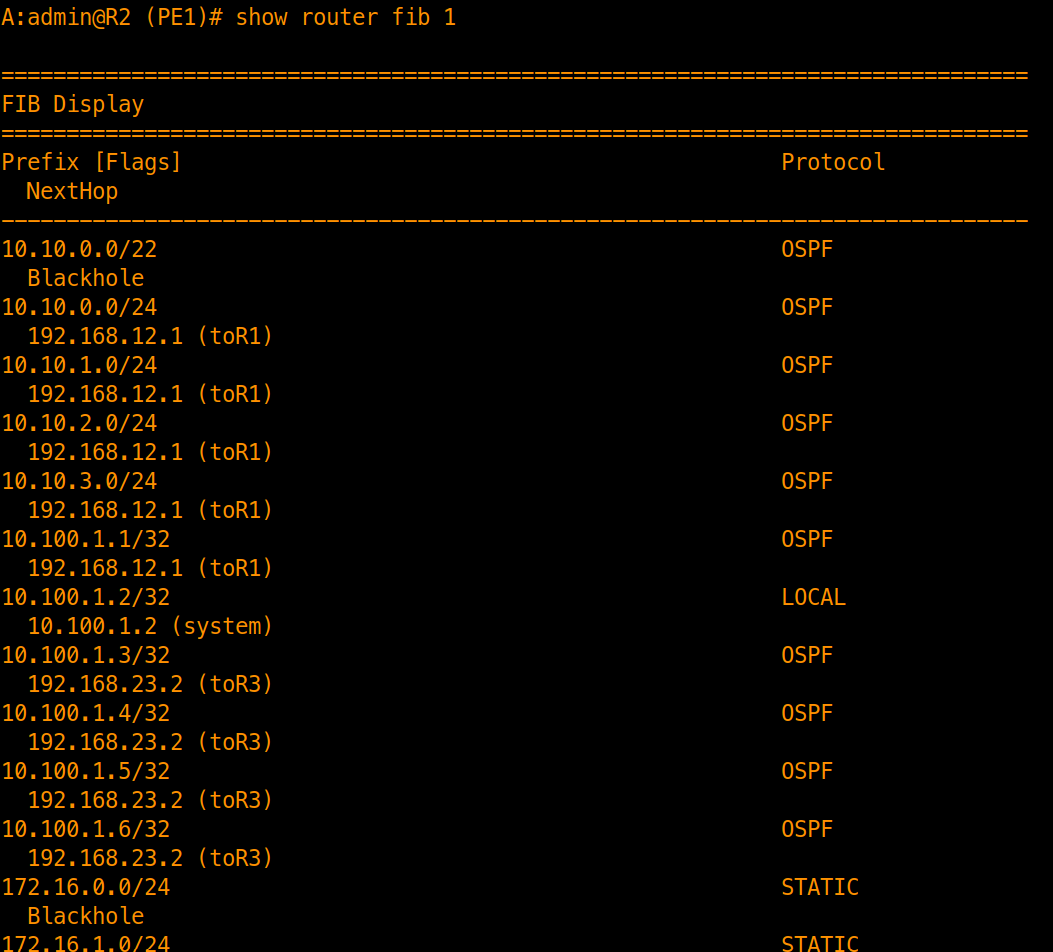
At this point, backup next-hops exist in the route table but not in the FIB.
/show router fib 1
Step 3: IP FRR Configuration (R2)
Enable IP Fast-Reroute under the routing options context to program the pre-calculated LFA next-hops into the FIB:
/configure routing-options ip-fast-reroute true
/commit
Step 4: Verify FIB Programming
Verify that the backup next-hops are installed in hardware forwarding:
/show router fib 1
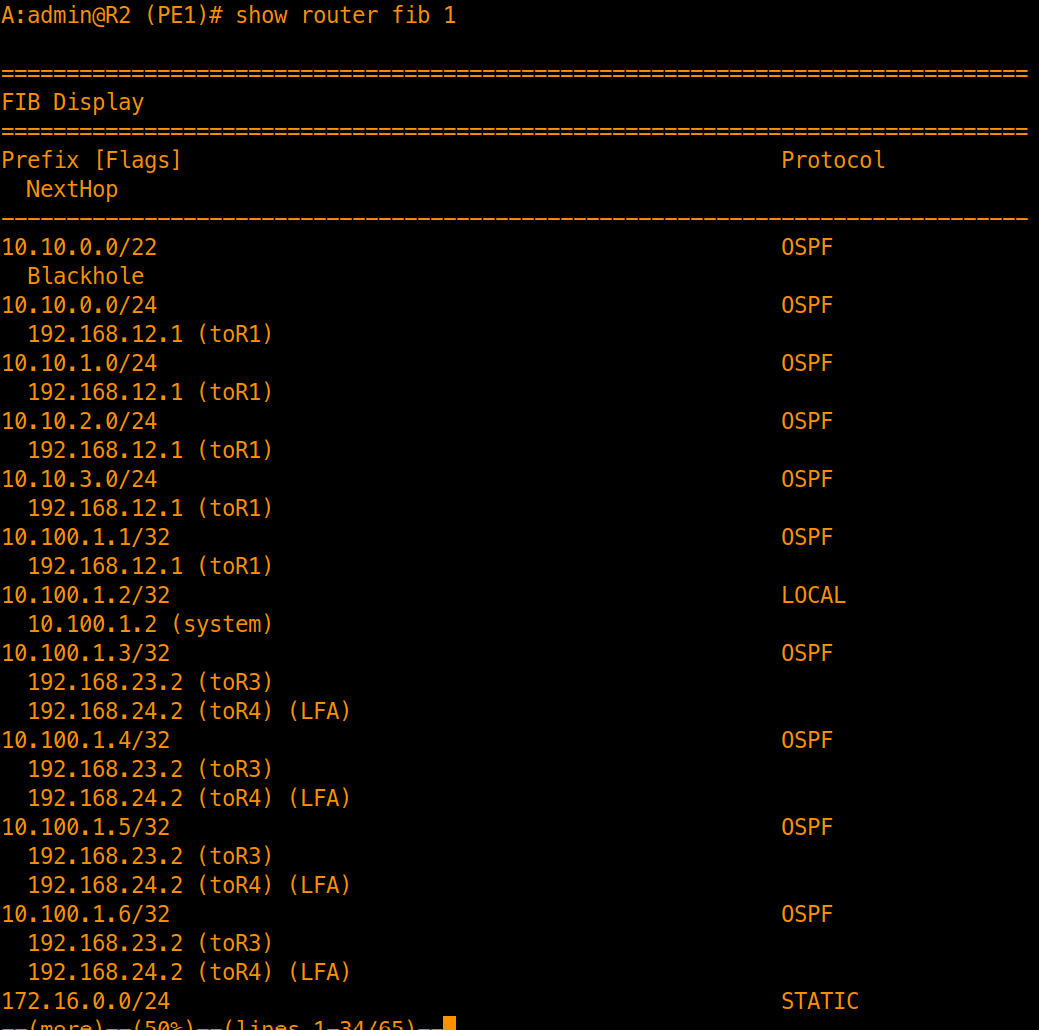
- Success Criteria: The LFA entries are active in the FIB, ready for sub-50ms cutover if the primary path fails.