Dynamic routing protocols like OSPF dynamically calculate the shortest path through a network using link metrics. By default, OSPF calculates interface cost based on reference bandwidth (100 Mbps / bandwidth). However, in modern networks with disparate WAN links (such as high-speed fiber vs. low-bandwidth backup copper), default calculations may not accurately reflect desired traffic paths.
To enforce traffic engineering, network administrators manually tune OSPF interface costs to prefer primary fiber paths over backup links.
Lab Objective: Connect three office locations using Single-Area OSPFv2, manually adjust interface costs to prefer the high-speed fiber link over copper links, and verify dynamic route convergence during a simulated link failure.
📁 Lab File: Download the Single-Area OSPFv2 Path Selection Packet Tracer Lab (.pkt).
Topology
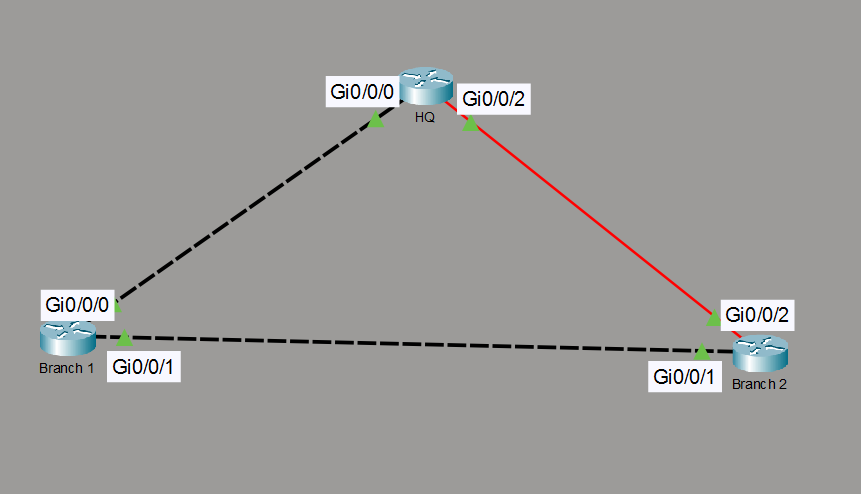
The topology forms a triangular WAN network connecting an HQ hub and two branch offices. HQ connects to Branch 2 via a primary fiber link and to Branch 1 via a backup copper link.
| Local Router | Local Interface | Remote Router | Remote Interface | Link Purpose / Cost Adjustment |
|---|---|---|---|---|
| HQ | Gi0/0/2 | Branch 2 | Gi0/0/2 | Primary Fiber Link (Default Cost: 1) |
| HQ | Gi0/0/0 | Branch 1 | Gi0/0/0 | Backup Copper Link (Manual Cost: 500) |
| Branch 1 | Gi0/0/1 | Branch 2 | Gi0/0/1 | Inter-Branch Link (Default Cost: 1) |
Router Configuration
Configure interfaces, assign IP addressing, adjust the OSPF cost on the HQ copper interface, and instantiate OSPFv2 across Area 0 with explicit router IDs.
HQ Router (Primary Hub)
enable
configure terminal
hostname HQ

! --- Configure Fiber Interface to Branch 2 ---
interface GigabitEthernet0/0/2
 description Fiber Link to Branch 2
 ip address 10.1.1.1 255.255.255.252
 no shutdown
exit

! --- Configure Copper Interface to Branch 1 ---
interface GigabitEthernet0/0/0
 description Backup Copper Link to Branch 1
 ip address 10.1.1.5 255.255.255.252
 ip ospf cost 500
 no shutdown
exit

! --- Instantiate OSPFv2 ---
router ospf 1
 router-id 1.1.1.1
 network 10.1.1.0 0.0.0.3 area 0
 network 10.1.1.4 0.0.0.3 area 0
exit
Branch 1 Router (Intermediate Node)
enable
configure terminal
hostname Branch1

! --- Configure Interface to HQ ---
interface GigabitEthernet0/0/0
 description Link to HQ
 ip address 10.1.1.6 255.255.255.252
 no shutdown
exit

! --- Configure Interface to Branch 2 ---
interface GigabitEthernet0/0/1
 description Link to Branch 2
 ip address 10.1.1.9 255.255.255.252
 no shutdown
exit

! --- Instantiate OSPFv2 ---
router ospf 1
 router-id 2.2.2.2
 network 10.1.1.4 0.0.0.3 area 0
 network 10.1.1.8 0.0.0.3 area 0
exit
Branch 2 Router (Destination Node)
enable
configure terminal
hostname Branch2

! --- Configure Interface to HQ ---
interface GigabitEthernet0/0/2
 description Fiber Link to HQ
 ip address 10.1.1.2 255.255.255.252
 no shutdown
exit

! --- Configure Interface to Branch 1 ---
interface GigabitEthernet0/0/1
 description Link to Branch 1
 ip address 10.1.1.10 255.255.255.252
 no shutdown
exit

! --- Instantiate OSPFv2 ---
router ospf 1
 router-id 3.3.3.3
 network 10.1.1.0 0.0.0.3 area 0
 network 10.1.1.8 0.0.0.3 area 0
exit
Verification
Validate neighbor adjacencies, path cost calculations, actual packet paths, and failover behavior across the topology.
Verify OSPF Neighbor Adjacencies:
Execute
show ip ospf neighboronHQto confirm neighborship:HQ# show ip ospf neighbor Neighbor ID Pri State Dead Time Address Interface 2.2.2.2 1 FULL/DR 00:00:36 10.1.1.6 GigabitEthernet0/0/0 3.3.3.3 1 FULL/DR 00:00:38 10.1.1.2 GigabitEthernet0/0/2Result: Both neighbors show
FULLstate, confirming full Link State Database (LSDB) synchronization.Inspect Routing Table for Path Preference:
Inspect
HQ’s routing table to verify path cost calculation to Branch 2’s subnet (10.1.1.8/30):HQ# show ip route ospf 10.0.0.0/8 is variably subnetted, 5 subnets, 2 masks O 10.1.1.8 [110/2] via 10.1.1.2, 00:04:12, GigabitEthernet0/0/2Result: OSPF prefers the direct fiber path (
via 10.1.1.2) with a metric cost of 2, completely bypassing the direct copper link to Branch 1 which has a cost penalty of 500.Verify Data Plane Path via Traceroute:
Trace the path from
HQto Branch 2’s interface (10.1.1.10):HQ# traceroute 10.1.1.10 Type escape sequence to abort. Tracing the route to 10.1.1.10 1 10.1.1.2 0 msec 0 msec 0 msecResult: Traffic reaches the destination in a single hop over the high-speed fiber link.
Verify Convergence:
Simulate a physical failure on the primary fiber link by shutting down
Gi0/0/2onHQ:HQ(config)# interface GigabitEthernet0/0/2 HQ(config-if)# shutdownAfter receiving the OSPF adjacency down log, re-examine the routing table:
HQ# show ip route ospf
    10.0.0.0/8 is variably subnetted, 3 subnets, 2 masks
O       10.1.1.8 [110/501] via 10.1.1.6, 00:00:16, GigabitEthernet0/0/0
Result: OSPF immediately reconverges, routing traffic through the backup copper path (
via 10.1.1.6) with a combined cost of 501. Issuingno shutdownonGi0/0/2automatically restores the primary fiber path.