Unencrypted administrative access poses a major security risk in enterprise environments. Legacy protocols like Telnet transmit credentials and CLI sessions in cleartext, exposing management traffic to packet sniffing and man-in-the-middle attacks.
Hardening remote access can be achieved by disabling Telnet, forcing SSH v2 for all Virtual Terminal (VTY) lines, and enforcing remote and/or local database authentication.
Lab Objective: Disable insecure Telnet access on Cisco ISR router and Catalyst switch, configure RSA key pairs with SSH Version 2, build a local privilege 15 administrator account, and verify that unauthorized Telnet sessions are rejected.
📁 Lab File: Download the Remote Access Hardening Packet Tracer Lab (.pkt).
Topology
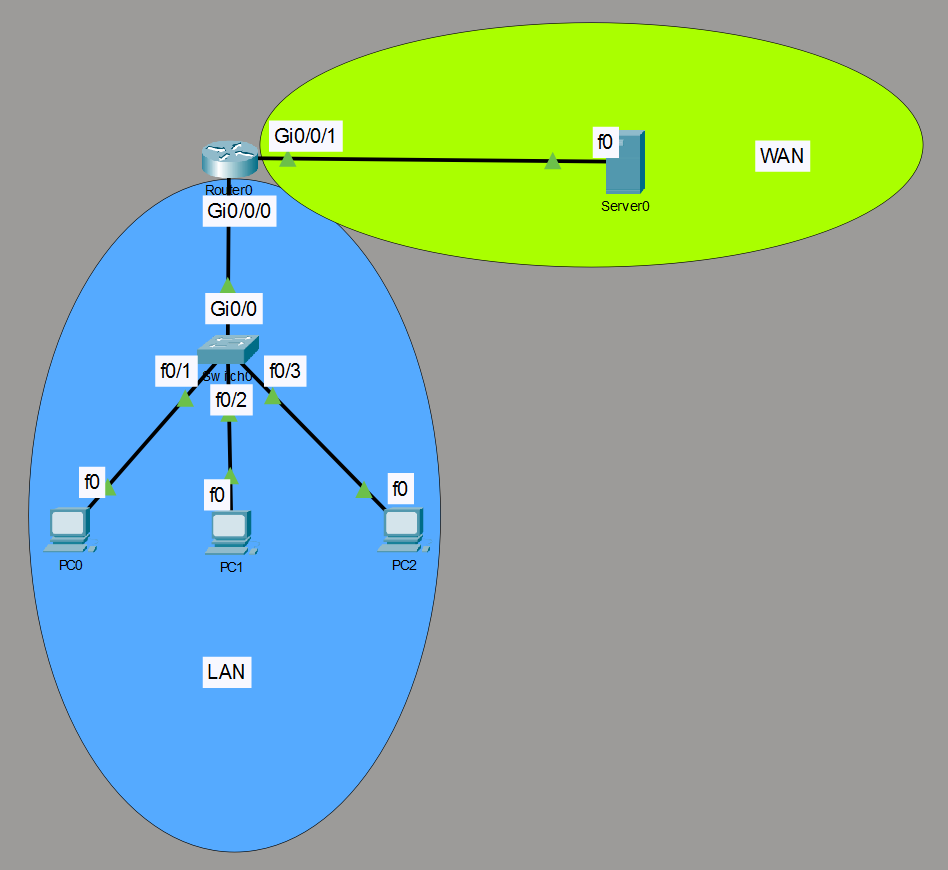
The topology consists of an internal LAN segment (192.168.10.0/24) connecting admin workstations to Switch0 and the edge router (Router0). An external server segment (203.0.113.0/24) connects via Gi0/0/1.
| Device | Interface | Role | IP Address | Subnet Mask | Default Gateway |
|---|---|---|---|---|---|
| PC0 | Fa0 | Admin Workstation | 192.168.10.10 | 255.255.255.0 | 192.168.10.1 |
| PC1 | Fa0 | User Workstation | 192.168.10.11 | 255.255.255.0 | 192.168.10.1 |
| PC2 | Fa0 | User Workstation | 192.168.10.12 | 255.255.255.0 | 192.168.10.1 |
| Switch0 | VLAN 1 | Access Switch Mgmt | 192.168.10.2 | 255.255.255.0 | 192.168.10.1 |
| Router0 | Gi0/0/0 | LAN Gateway | 192.168.10.1 | 255.255.255.0 | N/A |
| Router0 | Gi0/0/1 | WAN Segment | 203.0.113.1 | 255.255.255.0 | N/A |
Device Configuration
Both Router0 and Switch0 require identical access hardening steps: establishing a domain identity, generating RSA encryption keys, forcing SSH Version 2, creating local credentials, and restricting VTY line input.
Router0 (Edge Gateway)
enable
configure terminal
hostname Router0

! --- Step A: Identity & Credentials ---
ip domain-name lab.local
username admin privilege 15 secret Cisco123!

! --- Step B: Key Generation & SSH v2 Enforcement ---
crypto key generate rsa
1024
ip ssh version 2

! --- Step C: VTY Line Hardening ---
line vty 0 4
 transport input ssh
 login local
exit

write memory
Switch0 (Access Switch)
enable
configure terminal
hostname Switch0

! --- Step A: Identity & Credentials ---
ip domain-name lab.local
username admin privilege 15 secret Cisco123!

! --- Step B: Key Generation & SSH v2 Enforcement ---
crypto key generate rsa
1024
ip ssh version 2

! --- Step C: VTY Line Hardening ---
line vty 0 15
 transport input ssh
 login local
exit

write memory
Verification
Verify that insecure Telnet connections are rejected, test SSH access using local credentials, and verify active encrypted sessions on the CLI.
| Step | Test | Command | Expected Result |
|---|---|---|---|
| 1 | Fail Test (Telnet) | telnet 192.168.10.1 (PC0) | Connection fails or times out (Connection closed by foreign host). |
| 2 | Success Test (SSH) | ssh -l admin 192.168.10.1 (PC0) | Password prompt appears; successful password entry opens CLI. |
| 3 | Verify SSH Engine | show ip ssh (Router0) | Output confirms SSH Enabled - version 2.0. |
| 4 | Inspect Active Sessions | show ssh (Router0) | Displays active connections. |
Step 1: Reject Insecure Telnet Attempts
From the Command Prompt on PC0, attempt a Telnet session to Router0:
C:\> telnet 192.168.10.1
Trying 192.168.10.1 ...Open

[Connection to 192.168.10.1 closed by foreign host]
Step 2: Establish Encrypted SSH Session
Connect to Router0 using SSH with the local administrator account created in Step A:
C:\> ssh -l admin 192.168.10.1

Password:

Router0#
Step 3: Verify Global SSH Engine Status (show ip ssh)
Run show ip ssh on Router0 to verify that SSH v2 is enforced globally:
Router0# show ip ssh
SSH Enabled - version 2.0
Authentication timeout: 120 secs; Authentication retries: 3
Step 4: Inspect Active Encrypted Sessions (show ssh)
While logged in via SSH from PC0, execute show ssh on Router0 to verify connection details:
Router0# show ssh
Connection Version  Mode  Encryption  Hmac         State           Username
0          1.99     IN    aes128-cbc  hmac-sha1    Session started admin
0          1.99     OUT   aes128-cbc  hmac-sha1    Session started admin
%No SSHv1 server connections running.