Dynamic routing protocols like OSPF provide automated path calculation, but relying solely on dynamic neighbor adjacencies across secondary links isn’t always feasible, especially on metered backup connections (like 4G/5G or satellite), untrusted third-party WANs, or legacy links where running continuous Hello packets introduces unnecessary overhead and instability.
Floating Static Routes solve this by serving as a low-overhead, deterministic backup mechanism. By assigning an Administrative Distance (AD) higher than the primary dynamic protocol, the static route remains completely dormant in the background, activating only when the primary dynamic route is withdrawn from the routing table.
Lab Objective: Configure a primary fiber link running Single-Area OSPFv2, deploy a floating static route with an AD of 210 over a secondary backup link, and verify route failover and preemption behavior during a primary link outage.
📁 Lab File: Download the Floating Static Routes Packet Tracer Lab (.pkt).
Topology
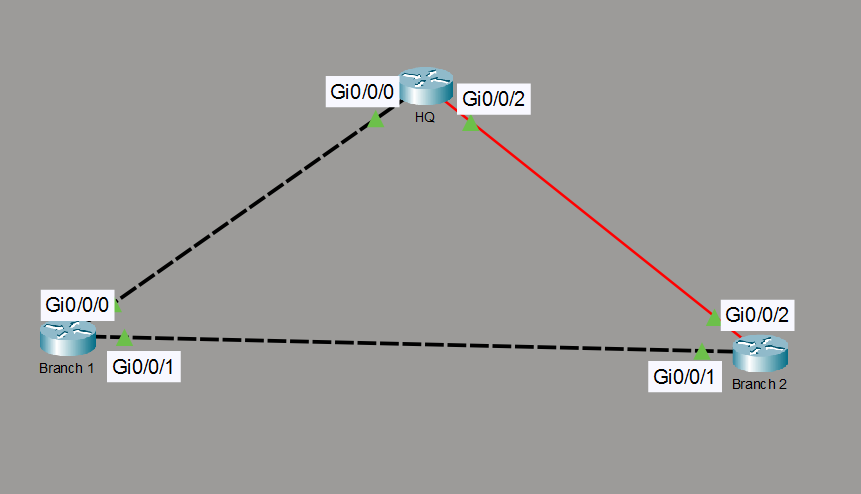
HQ connects to Branch 2 over a high-speed primary fiber link running OSPFv2. A separate secondary link connects HQ to Branch 1, which reaches Branch 2 statically.
| Local Router | Local Interface | Remote Router | Remote Interface | Network / Subnet | Role / Routing Method |
|---|---|---|---|---|---|
| HQ | Gi0/0/2 | Branch 2 | Gi0/0/2 | 10.1.1.0/30 | Primary Fiber Path (OSPF AD 110) |
| HQ | Gi0/0/0 | Branch 1 | Gi0/0/0 | 10.1.1.4/30 | Backup Link (Floating Static AD 210) |
| Branch 1 | Gi0/0/1 | Branch 2 | Gi0/0/1 | 10.1.1.8/30 | Inter-Branch Link (Static Forwarding) |
Router Configuration
Configure dynamic OSPF routing across the primary link, then apply an elevated Administrative Distance of 210 to the backup static route on HQ.
HQ Router (Primary Hub)
enable
configure terminal
hostname HQ

! --- Primary Fiber Interface (OSPF Enabled) ---
interface GigabitEthernet0/0/2
 description Primary Fiber to Branch 2
 ip address 10.1.1.1 255.255.255.252
 no shutdown
exit

! --- Secondary Backup Interface (Static Only) ---
interface GigabitEthernet0/0/0
 description Backup Copper to Branch 1
 ip address 10.1.1.5 255.255.255.252
 no shutdown
exit

! --- Enable OSPF Only on Primary Fiber Subnet ---
router ospf 1
 router-id 1.1.1.1
 network 10.1.1.0 0.0.0.3 area 0
exit

! --- Configure Floating Static Route to Branch 2 Subnet ---
! Syntax: ip route [network] [mask] [next_hop] [admin_distance]
ip route 10.1.1.8 255.255.255.252 10.1.1.6 210
Branch 1 Router (Intermediate Backup Node)
enable
configure terminal
hostname Branch1

! --- Interface to HQ ---
interface GigabitEthernet0/0/0
 description Link to HQ
 ip address 10.1.1.6 255.255.255.252
 no shutdown
exit

! --- Interface to Branch 2 ---
interface GigabitEthernet0/0/1
 description Link to Branch 2
 ip address 10.1.1.9 255.255.255.252
 no shutdown
exit

! --- Static Route to reach Branch 2 Subnet ---
ip route 10.1.1.8 255.255.255.252 10.1.1.10
Branch 2 Router (Destination Node)
enable
configure terminal
hostname Branch2

! --- Primary Fiber Interface ---
interface GigabitEthernet0/0/2
 description Primary Fiber to HQ
 ip address 10.1.1.2 255.255.255.252
 no shutdown
exit

! --- Interface to Branch 1 ---
interface GigabitEthernet0/0/1
 description Link to Branch 1
 ip address 10.1.1.10 255.255.255.252
 no shutdown
exit

! --- Enable OSPF on Primary Fiber Link ---
router ospf 1
 router-id 3.3.3.3
 network 10.1.1.0 0.0.0.3 area 0
 network 10.1.1.8 0.0.0.3 area 0
exit

! --- Return Static Route to HQ via Branch 1 ---
ip route 10.1.1.4 255.255.255.252 10.1.1.9 210
Verification
Validate that the floating static route remains inactive while OSPF is online, installs automatically upon primary link failure, and pre-empts after link restoration.
Verify Primary OSPF Path Dominance:
Inspect the routing table on
HQwhile the primary link is online:HQ# show ip route ospf 10.0.0.0/8 is variably subnetted, 5 subnets, 2 masks O 10.1.1.8 [110/2] via 10.1.1.2, 00:03:15, GigabitEthernet0/0/2Result: The OSPF route with AD 110 is installed in the active RIB. Running
show ip route staticreturns no active entries, confirming the AD 210 route is cleanly floating in the background configuration.Simulate Primary Link Outage:
Shut down the primary fiber interface on
HQto break the OSPF adjacency:HQ(config)# interface GigabitEthernet0/0/2 HQ(config-if)# shutdownObserve Automatic Route Failover:
Re-examine
HQ’s routing table immediately after the interface shutdown:HQ# show ip route static 10.0.0.0/8 is variably subnetted, 3 subnets, 2 masks S 10.1.1.8/30 [210/0] via 10.1.1.6Result: Once the primary AD 110 OSPF route is withdrawn, the routing engine immediately installs the floating static route (
AD 210) into the routing table.Verify Path Preemption:
Restore the primary fiber interface on
HQ:HQ(config)# interface GigabitEthernet0/0/2 HQ(config-if)# no shutdownResult: As soon as the OSPF adjacency reconverges (
AD 110), the router automatically removes the backup static route (AD 210) from the active table and restores it to floating standby status.